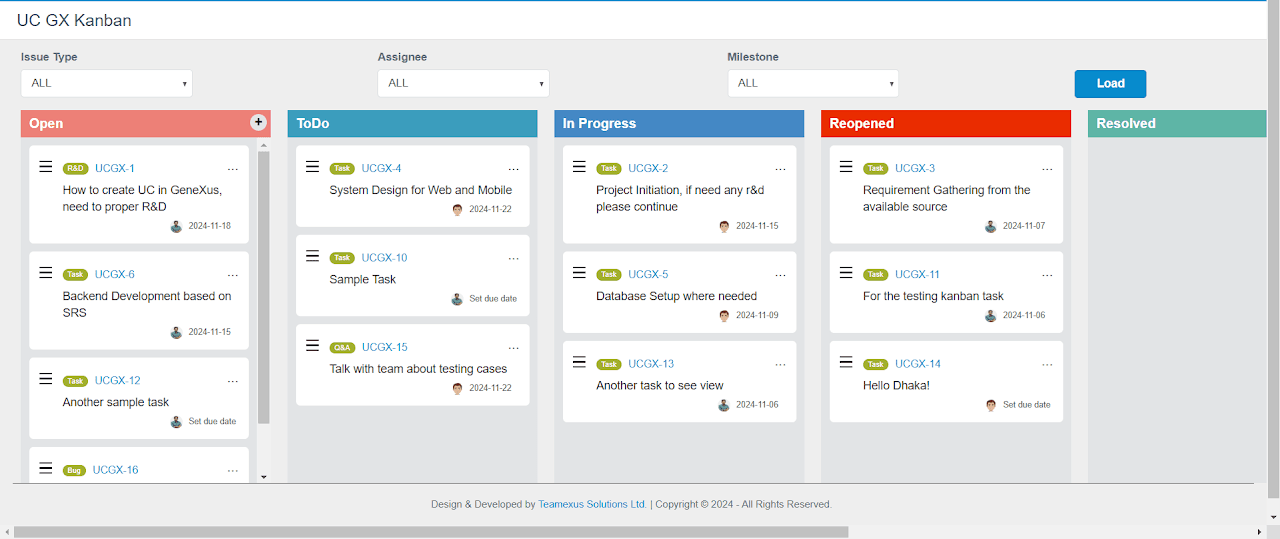
GeneXus is good at generating CRUD and business logic fast; it's not naturally good at drag-and-drop task boards. GxJKanBan closes that gap — it's a user control I built at Teamexus that wraps JKanban so a Web Panel gets a real Kanban board without writing any JavaScript yourself.
What it does
GxJKanBan gives you a customizable board-and-task interface: configure columns (boards) and tasks (items) to match your workflow, drag tasks between boards to change status, and manage due dates through a built-in Flatpickr date picker. Every interaction — adding, viewing, editing, copying, dragging — fires a GeneXus event, so the board behaves like any other data-bound control in your app.
In GeneXus: Knowledge Manager → Import → Select KB → Load → Import, then pick the downloaded .xpz.
Open a Web Panel, drag the UCJkanban control in from the Toolbox, and initialize it.
The data shape
Everything renders from one SDT, KanbanItems — a collection of boards, each holding a collection of tasks:
KanbanItem (a board): id, title, class, colorcode, isAddBtn
KanbanItem.Items.itemsItem (a task): TaskID, TaskKey, TaskType, TaskName, TaskStartDate, TaskEndDate
isAddBtn is worth calling out — set it true on the board where you want an inline "add task" affordance to appear (typically your leftmost "To Do" column) and false elsewhere.
Read these inside an event handler to know exactly what the user just did:
AddedTaskSubject — subject of the newly added task
AddedBoardId — ID of the board a new task was added to
SelectedTaskId — ID of the task involved in the current action
BelowSelectedTaskId — ID of the task now below the dragged one ('0' if it landed last in its board)
SelectedTaskEndDate — the task's (new) end date
DragStatusTypeId — the task's new status/type after a drag
SelectedBoardId — ID of the board involved in a drag
SelectedBoardPosition — the board's new position after a drag
Events
Seven events cover the task lifecycle: AddTask, ViewTask, EditTask, DragTask, CopyTask (fires when a task's URL is copied), SetDueTask, and DragBoard. Each fires with the relevant runtime properties already populated.
The pattern that works well: treat KanbanItems as the single source of truth. An event handler reads the runtime properties it needs, updates your actual data (a task table, a status field), and — if the change should be reflected visually — repopulates KanbanItems from that data rather than mutating the board's in-memory state directly.
Wiring it up
A trimmed version of the reference implementation — populating two boards with dummy data, then handling all seven events:
Event Refresh
    &KanbanItems.Clear()

    &KanbanItem = New()
    &KanbanItem.id = !'1'
    &KanbanItem.title = !'ToDo'
    &KanbanItem.class = !'todo'
    &KanbanItem.colorcode = !'#0D3661'
    &KanbanItem.isAddBtn = true

    &KanbanItemTask = New()
    &KanbanItemTask.TaskID = !'1'
    &KanbanItemTask.TaskKey = !'Key1'
    &KanbanItemTask.TaskType = !'R&D'
    &KanbanItemTask.TaskName = !'This is a normal task'
    &KanbanItemTask.TaskStartDate = &Today
    &KanbanItemTask.TaskEndDate = &Today.AddDays(3)
    &KanbanItem.items.Add(&KanbanItemTask)

    &KanbanItems.Add(&KanbanItem)

    &KanbanItem = New()
    &KanbanItem.id = !'2'
    &KanbanItem.title = !'Open'
    &KanbanItem.class = !'open'
    &KanbanItem.colorcode = !'#FF8000'
    &KanbanItem.isAddBtn = false

    &KanbanItemTask = New()
    &KanbanItemTask.TaskID = !'4'
    &KanbanItemTask.TaskKey = !'Key4'
    &KanbanItemTask.TaskType = !'Design'
    &KanbanItemTask.TaskName = !'This is a design task'
    &KanbanItemTask.TaskStartDate = &Today
    &KanbanItemTask.TaskEndDate = &Today.AddDays(4)
    &KanbanItem.items.Add(&KanbanItemTask)

    &KanbanItems.Add(&KanbanItem)
EndEvent

Event UCJKanban1.AddTask
    &AddedBoardIdStr = UCJKanban1.AddedBoardId
    msg('Which board: ' + &AddedBoardIdStr)
EndEvent

Event UCJKanban1.ViewTask
    &TaskIdStr = UCJKanban1.SelectedTaskId
    msg('Which task need to view: ' + &TaskIdStr)
EndEvent

Event UCJKanban1.EditTask
    &TaskIdStr = UCJKanban1.SelectedTaskId
    msg('Which task need to edit: ' + &TaskIdStr)
EndEvent

Event UCJKanban1.DragTask
    &BelowTaskIdStr = UCJKanban1.BelowSelectedTaskId
    &TaskIdStr = UCJKanban1.SelectedTaskId
    &TaskTypeStr = UCJKanban1.DragStatusTypeId
    msg('Which task need to drag: ' + &TaskIdStr + ', after drag, below item: ' + &BelowTaskIdStr + ', and new task type is: ' + &TaskTypeStr)
EndEvent

Event UCJKanban1.CopyTask
    &TaskIdStr = UCJKanban1.SelectedTaskId
    msg('Which task need to copy: ' + &TaskIdStr)
EndEvent

Event UCJKanban1.SetDueTask
    &TaskEndDateStr = UCJKanban1.SelectedTaskEndDate
    &YearStr = &TaskEndDateStr.Trim().Substring(1, 4)
    &MonthStr = &TaskEndDateStr.Trim().Substring(6, 2)
    &DayStr = &TaskEndDateStr.Trim().Substring(9, 2)
    &TaskIdStr = UCJKanban1.SelectedTaskId
    msg('Which task need to set end date: ' + &TaskIdStr + ', new end date is: ' + &DayStr + ' Day, ' + &MonthStr + ' Month, ' + &YearStr + ' Year')
EndEvent

Event UCJKanban1.DragBoard
    &SelectedBoardIdStr = UCJKanban1.SelectedBoardId
    &SelectedBoardPositionStr = UCJKanban1.SelectedBoardPosition
    msg('Which board need to drag: ' + &SelectedBoardIdStr + ', also this is the new position of board: ' + &SelectedBoardPositionStr)
EndEvent
SetDueTask is the fiddliest handler — SelectedTaskEndDate comes back as a string, so you slice year/month/day out of it by fixed offset (Substring(1,4) / Substring(6,2) / Substring(9,2)) rather than parsing it as a date. Worth wrapping in a helper if you're calling it from more than one place.
Reference
Full control-level behaviour (styling the board itself, beyond what the GeneXus properties expose) is documented upstream at JKanban.
Getting it
GxJKanBan is on the GeneXus Marketplace and the source is on GitHub. For support: gxkanbansupport@teamexus.com.